Keybindings Setup
Introduction Note
The key rebinding system provided by the asset uses the Unreal Engine Enhanced Input System. If you are still using the legacy deprecated inputs system, you will first need to convert your inputs to this new system. You can check out Unreal’s documentation to get started with Enhanced Inputs
An example of an Enhanced Input setup is available in the folder EasyOptionsMenu/DemoContent/Inputs with the inputs being used in the BP_EOM_DemoMainCharacter
To get started with the keybindings setup, you first need to configure which Input Mapping Contexts will be considered by the system and how grouping/conflicts should be handled.
To do so, open your Global Config Data Asset, you will then find the following relevant settings under the Options Menu section:

Keybinding Mapping ContextsThis variables defines the list of all the Input Mapping Contexts that will contain any rebindable inputs and you would like to be used in the Key Rebinding system. The text associated with each will be used as category name if grouping by Mapping Context-
Keybinding Mappings Grouping TypeThis variables defines how the keybindings are groupped when beind displayed inside the menuGroup by Mapping ContextWill group all the keybinds under a category defined by the input mapping contextGroup by Input CategoryWill group all the keybinds by each key's ownDisplay Category, regardless of the mapping context
-
Keybinding Mappings Conflict MethodThis variables defines how the keybindings conflicts should be handled by the systemConflicts by Input Mapping ContextOnly keys within the same input mapping context will conflict (regardless of display categories)Conflicts by CategoryOnly keys within the same display categories will conflict (regardless of Input Mapping Context) - Note that based on your input setup, this could create unwanted behaviors withing IMCs, consider using "Conflicts All" if suitableConflicts AllAll keys will be considered for conflicts (regardless of category or IMC), meaning no conflict will be allowed at all across all available keymappings
Once this is configured, open the Input Mapping Context(s) that you would like to be set up for rebinding
Then, for each key that you would like to appear in the keybindings setting (even if locked to the player), configure them with the following parameters described below
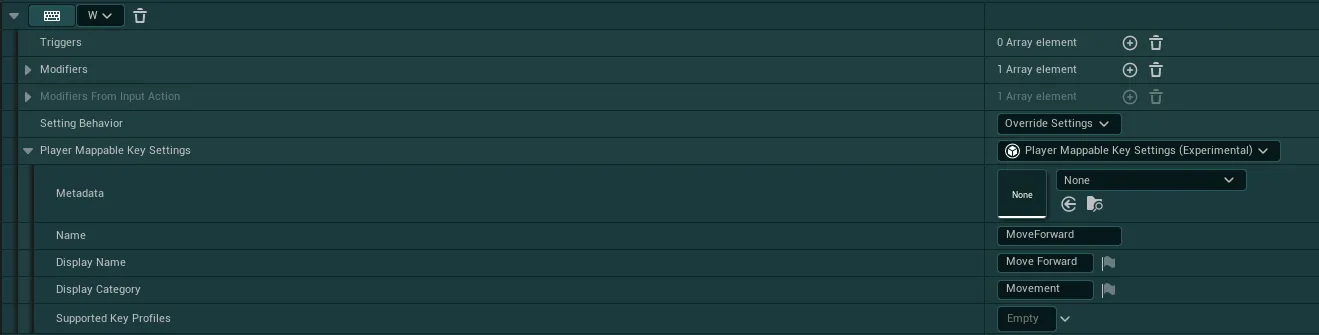
Setting BehaviorShould be set toOverride Settingsif the key needs to be visible in the settings,Ignore Settingsif it should be fully hiddenPlayer Mappable Key SettingsSimply selectPlayer Mappable Key Settingsin the dropdown for this variable-
NameMust be a fully unique name to describe the key. This name itself no real importance but it must be uniqueKeybind Modifiers
The system supports multiple "modifiers" that can be added to any given key to change its behavior. To add a modifier simply add
_ModifierNameto the end of your unique Name, the following modifiers are available:_SecondaryAny key with this modifier will be shown in a secondary slot (only supported for mouse/keyboard keys), it can be shown alongside a primary keybind in the same mapping_LockedAny key with this modifier will be displayed in the UI, but it won't be manually rebindable by the player_AllowConflictsAny key with this modifier will ignore all conflicts, this means any other keybinds is allowed to have the same key as this one_HoldAny key with this modifier will be shown as an "Hold" key, this doesn't modify the way the key rebinding works, only the visual of the key changes
You can combine any modifiers, for example:
MoveForward_Hold_LockedorMoveForward_AllowConflicts_Secondaryetc. -
Display NameThe name you wish to display in the UI, you can reuse the same text as other keys for this one, up to 3 keys can share a single Display Name (2 Mouse/Keyboard keys and 1 Gamepad Key), in which case they will be shown together in a single keybindings setting Display CategoryIf choosing to sort by key category inside the Global Config, this will be the category under which the key will be displayed- You can then ignore any settings that I did not mention