Hud Manager Utility Functions
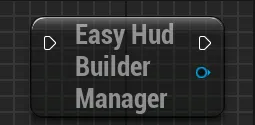
To control the HUD, you have access to various functions that you can call on the Hud Builder Manager. You will first need to get the reference of the component by using the function Get Easy Hud Builder Manager
Note
If you need to call any functions on the hud builder right at begin play, remember that you will need to wait for it to be fully initialized, you can use the provided Hud Builder Manager Initialized event for that
You can either access it from anywhere by getting the reference to the hud builder and binding onto the event like so:
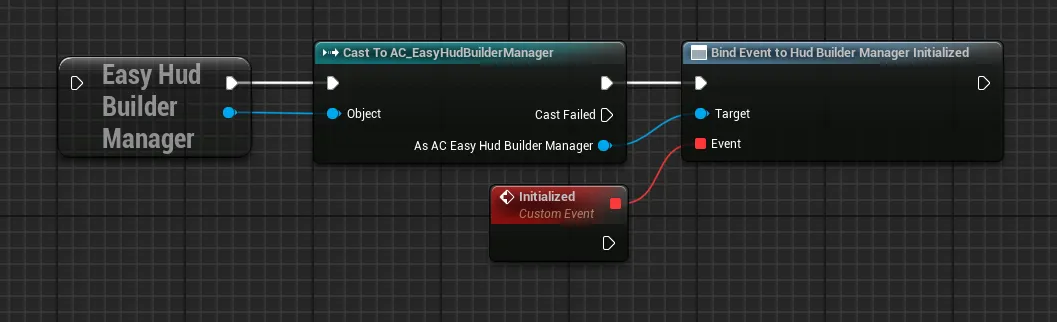
From there, you can call any of the following functions under the Easy Hud Builder Manager section, you can find more detail on each function in the dropdowns right below
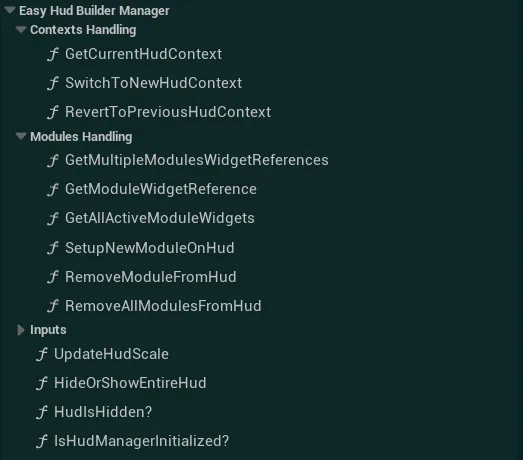
Hud Contexts Functions
Get Current Hud Context
Get the currently displayed Hud Context and return if different from the input context
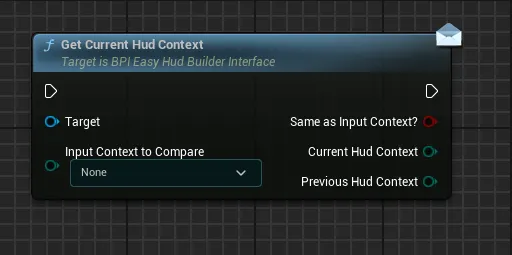
InputContextToCompareInput Context to check if the currently active context is set to this value or not
SameAsInputContext?Return True if the Input Context To Compare is the same as the Current Hud Context, False otherwiseCurrentHudContextCurrently selected Hud ContextPreviousHudContextPreviously selected Hud Context (before the last context switch, if any)
Switch to New Hud Context
Switch to a new defined hud context, removing all the modules from the previous context to display the new required modules
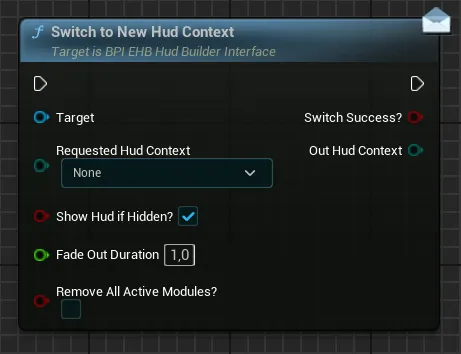
Requested Hud ContextTarget context that will be used to define which modules need to be displayedShow Hud If Hidden?If True, the hud will be forced to be shown again if it had been hidden before. If False, the Hud might remain hiddenFade Out DurationControl how long the current context will take to fade out before fading in the new contextRemove All Active ModulesIf True, all the modules on the hud (manually added and from context) will be removed, if False only the modules from the previous context will be removed, leaving any manually added module
Out Hud ContextReturn the newly active Hud Context, or the current one if the switch has failed, the switch has been aborted or this context is the same as the already active context
Revert to Previous Hud Context
Calling this function will revert to the last valid hud context
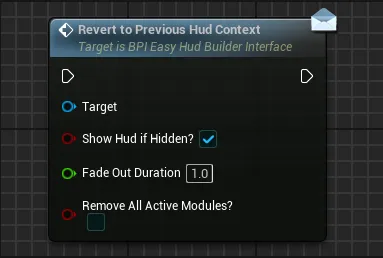
Show Hud If Hidden?If True, the hud will be forced to be shown again if it had been hidden before. If False, the Hud might remain hiddenFade Out DurationControl how long the current context will take to fade out before fading in the new contextRemove All Active ModulesIf True, all the modules on the hud (manually added and from context) will be removed, if False only the modules from the context will be removed, leaving any manually added module
Hud Modules Functions
Get Multiple Modules Widget References
Retrieve the widgets reference of the given modules
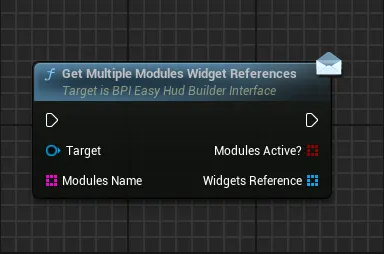
Modules NameArray of the unique name for the modules that need to be retrieved
Modules Active?Return an array of booleans corresponding of the input names array. Return for each given index if the associated module is currently valid and displayed on the HUD (either added manually or added from context)Widgets ReferenceReturn an array of widget references for the requested modules. The returned widgets are in the same order as the input names array.
Get Module Widget Reference
Retrieve the widget reference of any given module defined by the name
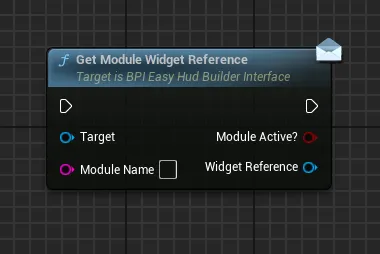
Module NameUnique name of the module that need to be retrieved
Module Active?Return True if the module is currently valid and displayed on the HUD (either added manually or added from context)Widget ReferenceReturn the reference of the widget on which you can call any of the BPI functions. For custom widgets, you can also use a “Cast To” node in order to call any custom functions you may have defined. This widget reference is always the same for a given module so it is safe to keep that as a variable.
Get All Active Module Widgets
Retrieve the references of all the modules widgets that are currently active on the Hud
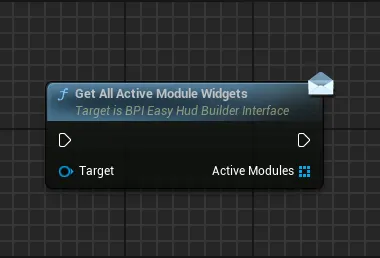
Active Modules Return the references of all the widgets currently valid and displayed on the HUD (either added manually or added from context)
Setup New Module on Hud
Manually add a given module to the Hud, the default layout of the module will be used in this situation unless overidden
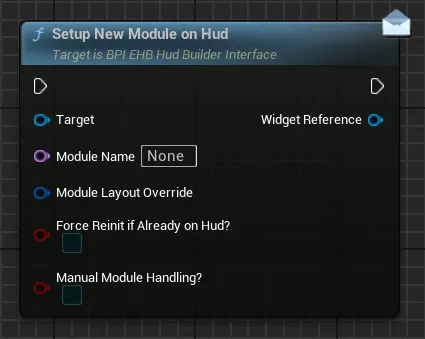
Module NameUnique name of the module that need to be added on Hud-
Module Layout OverrideSet of datas that allow to override the default widget layout based on needs, if you wish to override this layout, simply set theOverride Widget Default Values?checkbox to True and input your own module layout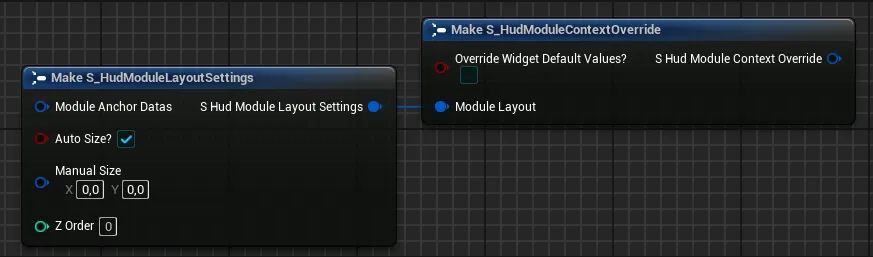
-
Force Reinit If Already on Hud?This setting only apply if the widget is already on the Hud (either added manually or from context).If True, the widget will be forced to reinitialize (play all the fade in animations and any initialization code, reset the layout with any new values), if false this will just retrieve the reference of the module widget (like “Get Module Widget Reference”) and the layout will remain unchanged
-
Manual Module Handling?If True, the module will not be considered as part of a context or manually added modules and will have to be manually handled by your code (switching contexts will not clear it, only explicit "clear" functions can remove it)
Widget ReferenceReturn the reference of the widget on which you can call any of the BPI functions. For custom widgets, you can also use a “Cast To” node in order to call any custom functions you may have defined. This widget reference is always the same for a given module so it is safe to keep that as a variable
Remove Module From Hud
Remove a given module from the Hud, regardless of the way it was added (manually or from a context)
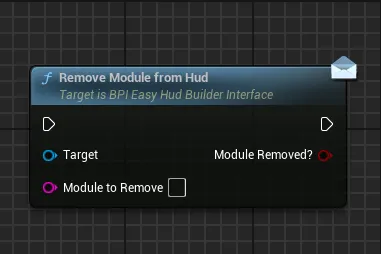
Module To RemoveUnique name of the module that need to be removed from the Hud
Module Removed?Return True if the module was successfully removed, if the value is False, it means that the module was not active on the Hud or was not found
Remove All Modules from Hud
Remove all the modules currently active on the Hud depending on the selection
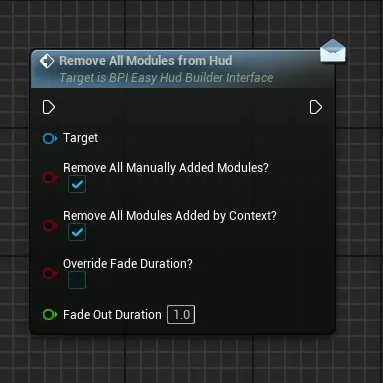
Remove All Manually Added Modules?If True, any module that has been manually added and that is active on the Hud will be removedRemove All Modules Added By Context?If True, any module added from the current context will be removed from the Hud (the context will be set to None)Override Fade Duration?If True, the fade out duration of the modules will be ignored and instead all the modules will use the defined fade out durationFade Out DurationControl the duration of the fade out if the override is needed
Hud Visibility Functions
Update Hud Scale
Update the global scale of the Hud, affecting all the widgets in it. This can be useful to control from a setting for example
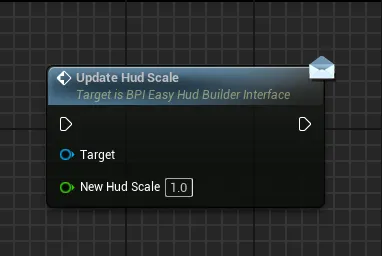
New Hud Scale New value of scale to display
Hide Or Show Entire Hud
Globally hide or show the hud, affecting only the visibility without modifying any of the modules or contexts currently active
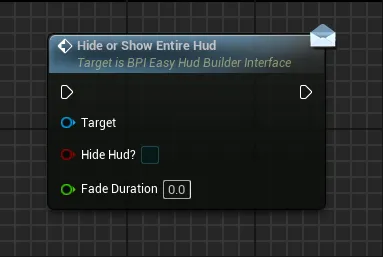
Hide Hud New visibility state of the Hud, calling the same state as the current visibility state won’t do anything
Fade Duration Duration of the global fade in/out animation if any
Hud Is Hidden?
Return the current global visibility state of the HUD as defined by the Hide or Show Entire Hud function
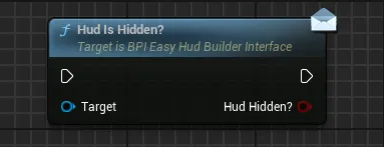
Hud Hidden? Current visibility state of the HUD after any Hide or Show Entire Hud function call