Game HUD Setup
Just like for the Game Instance, to figure out how to proceed you first need to check if your project is already using a custom Game HUD class or not.
You can either check this inside the Project Settings > Map and Modes section or inside any gamemode that you may have created. Once you found your gamemode or went inside the project settings check the HUD Class setting.
Then, based on what you see, identify which of the following 3 situations applies to your project:
Situation A: Default Engine Game HUD
What you see: The HUD Class setting displays the default HUD class in the dropdown
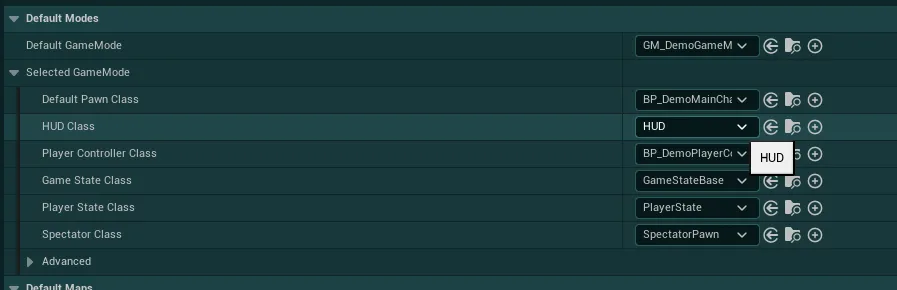
This means you do not have a custom Game HUD yet, follow Situation A instructions right below.
Situation A Instructions
Situation A
You don't have a custom Game HUD Class
To use the provided HUD Class you simply need to add the BP_EasyMainGameHUD class to your gamemode.
-
If you already have a gamemode either open it or go to the
Projects Settings>Map and Modessection and simply locate theHUD Classsetting underSelected GameMode. Then, replace this value with theBP_EasyMainGameHUDclass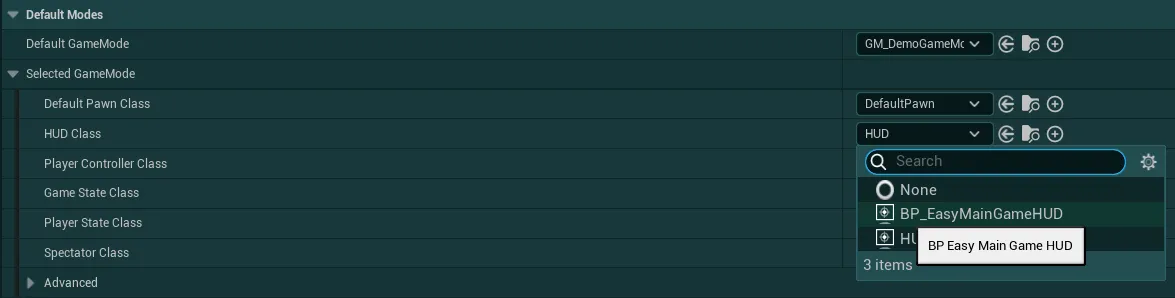
-
If you don't have a gamemode yet, I would recommend taking a look at the following Unreal Engine documentation to learn more about it and set up your own Gamemode Class. Once your Gamemode is set up, simply check back step 1.
Alternatively, you can use the provided demo gamemode (
GM_EGUI_DemoGameMode) by selecting it in the Project Settings or in the gamemodes dropdown, this will use the demo player controller and character alongside the correct HUD Class.
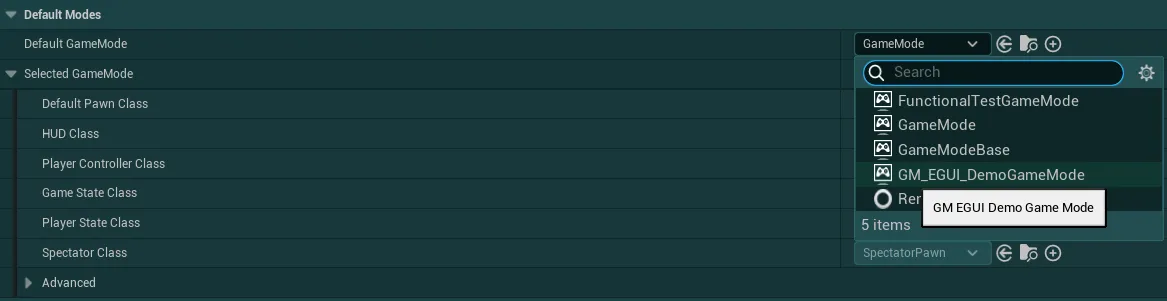
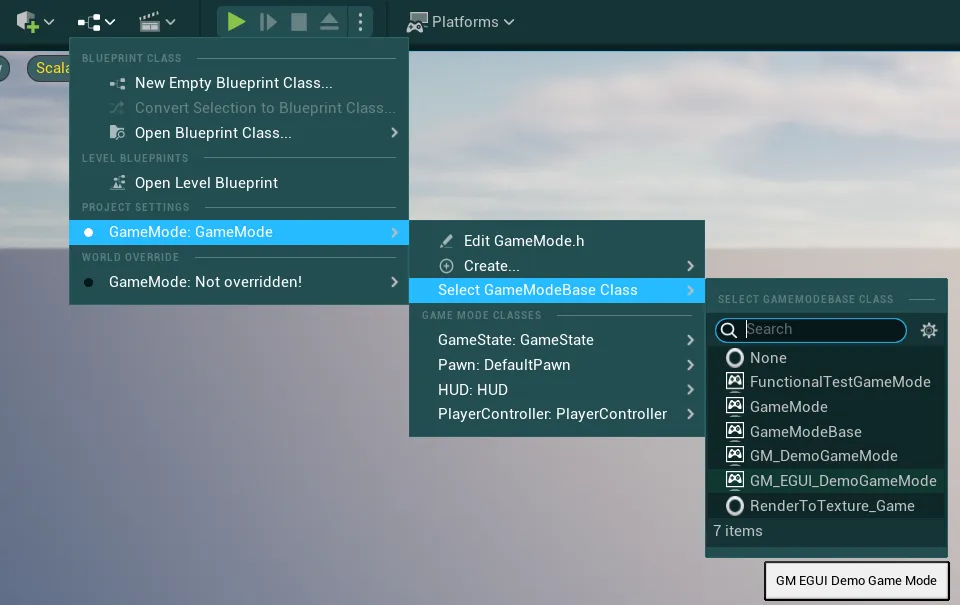
The provided gamemode, player controller and player character can all be located under
EasyGameUI/DemoContent/
Warning
If you have multiple gamemodes or levels that override the default gamemode class, make sure to set the HUD Class inside these overrides as well!
Situation B: Custom Blueprint Game HUD
What you see: The HUD Class setting displays a custom name (e.g., BP_MyGameHUD)
This means you already have a custom Game HUD. In this case, open this custom Game HUD and check the Parent Class on the top right corner.
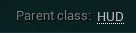
If the parent class is the generic engine HUD class, follow Situation B instructions right below.
Situation B Instructions
Situation B
You have a custom blueprint only Game HUD Class
-
Inside your own Game HUD, click on
Class Settingsand open the Details panel
-
Locate the
Parent Class ”HUD”setting under theClass Optionscategory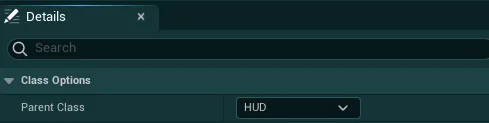
-
Click on the dropdown, search for the
BP_EasyMainGameHUDclass and click on it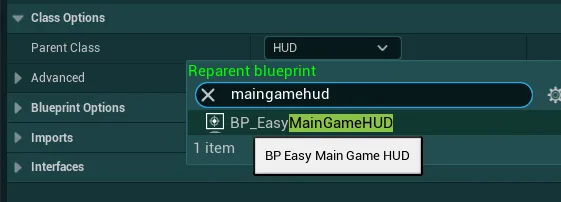
-
Unreal might display a warning popup about the operation, you can ignore it by clicking on
Reparent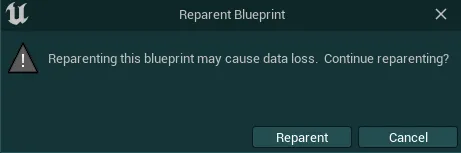
-
Then, if you have an
Event Begin Playinside your HUD, locate it (Ctrl + Fto search inside the blueprint)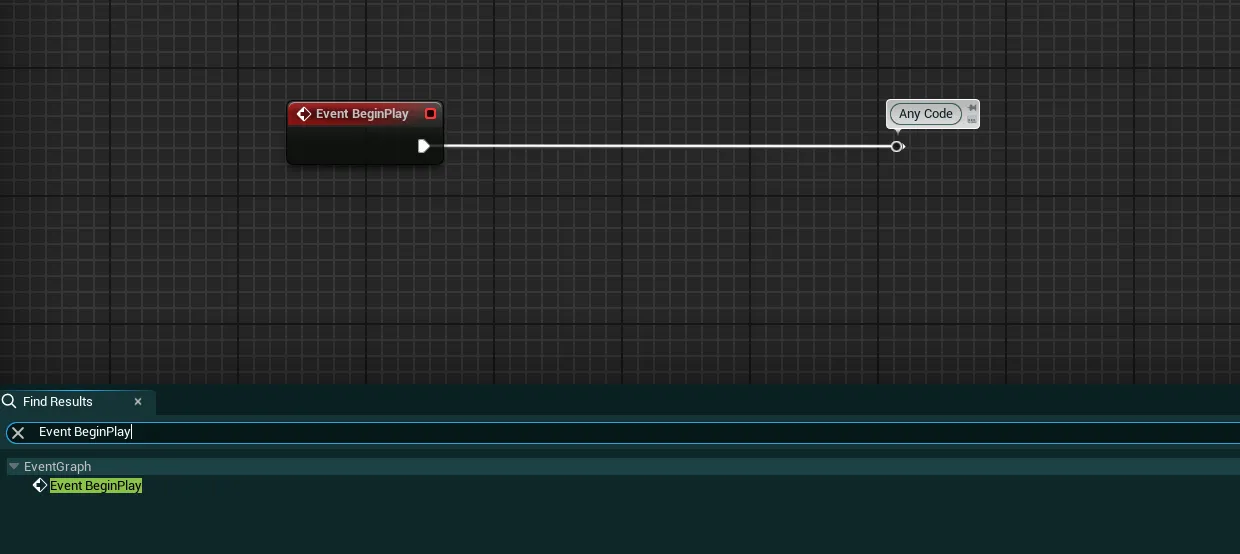
-
Right click on it and select
Add Call to Parent Function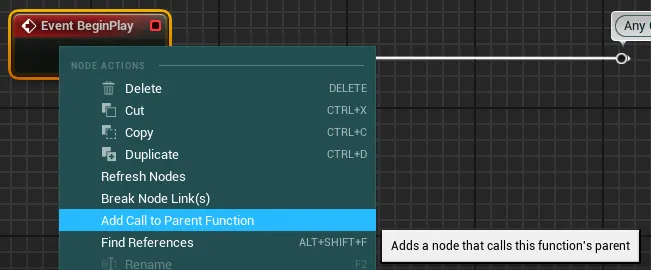
-
Plug in the newly generated node before any of your code like on the image below

-
Similarly, if you are using a node
Any Keyinside your HUD, locate it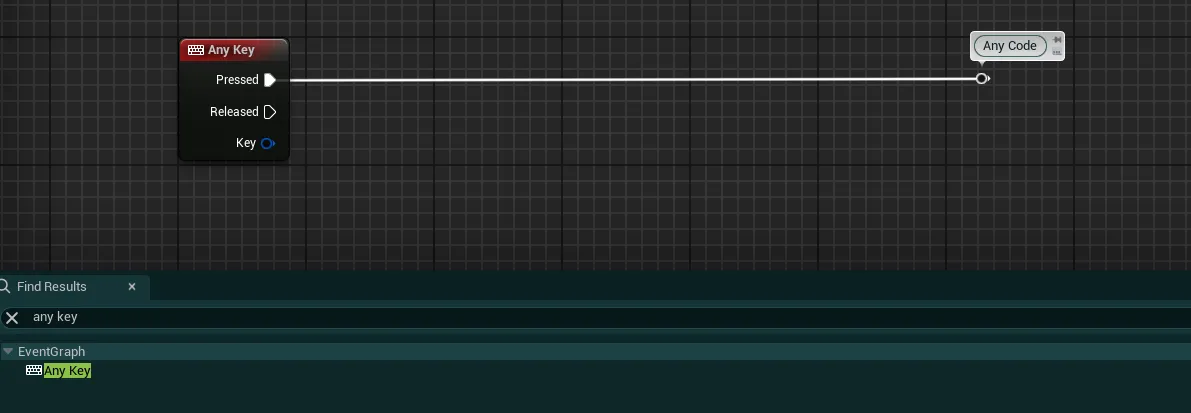
-
Then copy the following code and paste it beside the Any Key node
Begin Object Class=/Script/BlueprintGraph.K2Node_CallFunction Name="K2Node_CallFunction_0" ExportPath="/Script/BlueprintGraph.K2Node_CallFunction'/Game/EasyGameUI/Core/BP_EasyMainGameHUD.BP_EasyMainGameHUD:EventGraph.K2Node_CallFunction_0'" FunctionReference=(MemberName="HandleLocalAnyKeyInput",MemberGuid=3E0E222B41D4937801B1E9BC2FCEC8C1,bSelfContext=True) NodePosX=368 NodePosY=1680 NodeGuid=A25D01F8446F406EBDB35EA539707C8B CustomProperties Pin (PinId=B82933D146459F174FE78DB19CB833EB,PinName="execute",PinToolTip="\nExec",PinType.PinCategory="exec",PinType.PinSubCategory="",PinType.PinSubCategoryObject=None,PinType.PinSubCategoryMemberReference=(),PinType.PinValueType=(),PinType.ContainerType=None,PinType.bIsReference=False,PinType.bIsConst=False,PinType.bIsWeakPointer=False,PinType.bIsUObjectWrapper=False,PinType.bSerializeAsSinglePrecisionFloat=False,LinkedTo=(K2Node_Knot_5 3685F68847F3971B34227DA830F9809E,),PersistentGuid=00000000000000000000000000000000,bHidden=False,bNotConnectable=False,bDefaultValueIsReadOnly=False,bDefaultValueIsIgnored=False,bAdvancedView=False,bOrphanedPin=False,) CustomProperties Pin (PinId=ADEB07594E33134A18CEC6A64EE293B4,PinName="then",PinToolTip="\nExec",Direction="EGPD_Output",PinType.PinCategory="exec",PinType.PinSubCategory="",PinType.PinSubCategoryObject=None,PinType.PinSubCategoryMemberReference=(),PinType.PinValueType=(),PinType.ContainerType=None,PinType.bIsReference=False,PinType.bIsConst=False,PinType.bIsWeakPointer=False,PinType.bIsUObjectWrapper=False,PinType.bSerializeAsSinglePrecisionFloat=False,PersistentGuid=00000000000000000000000000000000,bHidden=False,bNotConnectable=False,bDefaultValueIsReadOnly=False,bDefaultValueIsIgnored=False,bAdvancedView=False,bOrphanedPin=False,) CustomProperties Pin (PinId=7D54E6084F761B4FABDCEE8ADF994FAD,PinName="self",PinFriendlyName=NSLOCTEXT("K2Node", "Target", "Target"),PinToolTip="Target\nSelf Object Reference",PinType.PinCategory="object",PinType.PinSubCategory="self",PinType.PinSubCategoryObject=None,PinType.PinSubCategoryMemberReference=(),PinType.PinValueType=(),PinType.ContainerType=None,PinType.bIsReference=False,PinType.bIsConst=False,PinType.bIsWeakPointer=False,PinType.bIsUObjectWrapper=False,PinType.bSerializeAsSinglePrecisionFloat=False,PersistentGuid=00000000000000000000000000000000,bHidden=False,bNotConnectable=False,bDefaultValueIsReadOnly=False,bDefaultValueIsIgnored=False,bAdvancedView=False,bOrphanedPin=False,) CustomProperties Pin (PinId=F2A1FA804343391597BF83BF536948CB,PinName="Pressed?",PinToolTip="Pressed?\nBoolean",PinType.PinCategory="bool",PinType.PinSubCategory="",PinType.PinSubCategoryObject=None,PinType.PinSubCategoryMemberReference=(),PinType.PinValueType=(),PinType.ContainerType=None,PinType.bIsReference=False,PinType.bIsConst=False,PinType.bIsWeakPointer=False,PinType.bIsUObjectWrapper=False,PinType.bSerializeAsSinglePrecisionFloat=False,DefaultValue="true",AutogeneratedDefaultValue="true",PersistentGuid=00000000000000000000000000000000,bHidden=False,bNotConnectable=False,bDefaultValueIsReadOnly=False,bDefaultValueIsIgnored=False,bAdvancedView=False,bOrphanedPin=False,) CustomProperties Pin (PinId=DADD34DA4825B2A00826658C86E2F2C5,PinName="Key",PinToolTip="Key\nKey Structure",PinType.PinCategory="struct",PinType.PinSubCategory="",PinType.PinSubCategoryObject="/Script/CoreUObject.ScriptStruct'/Script/InputCore.Key'",PinType.PinSubCategoryMemberReference=(),PinType.PinValueType=(),PinType.ContainerType=None,PinType.bIsReference=False,PinType.bIsConst=False,PinType.bIsWeakPointer=False,PinType.bIsUObjectWrapper=False,PinType.bSerializeAsSinglePrecisionFloat=False,DefaultValue="None",AutogeneratedDefaultValue="None",LinkedTo=(K2Node_Knot_3 A0CCC01B42EF0D3A4870BE9F3FEBB7BB,),PersistentGuid=00000000000000000000000000000000,bHidden=False,bNotConnectable=False,bDefaultValueIsReadOnly=False,bDefaultValueIsIgnored=False,bAdvancedView=False,bOrphanedPin=False,) End Object Begin Object Class=/Script/BlueprintGraph.K2Node_CallFunction Name="K2Node_CallFunction_1" ExportPath="/Script/BlueprintGraph.K2Node_CallFunction'/Game/EasyGameUI/Core/BP_EasyMainGameHUD.BP_EasyMainGameHUD:EventGraph.K2Node_CallFunction_1'" FunctionReference=(MemberName="HandleLocalAnyKeyInput",MemberGuid=3E0E222B41D4937801B1E9BC2FCEC8C1,bSelfContext=True) NodePosX=368 NodePosY=1872 NodeGuid=F1896428452AECE1008F81968BD0F02D CustomProperties Pin (PinId=B82933D146459F174FE78DB19CB833EB,PinName="execute",PinToolTip="\nExec",PinType.PinCategory="exec",PinType.PinSubCategory="",PinType.PinSubCategoryObject=None,PinType.PinSubCategoryMemberReference=(),PinType.PinValueType=(),PinType.ContainerType=None,PinType.bIsReference=False,PinType.bIsConst=False,PinType.bIsWeakPointer=False,PinType.bIsUObjectWrapper=False,PinType.bSerializeAsSinglePrecisionFloat=False,LinkedTo=(K2Node_Knot_4 02B20EEF4E7E7FADF776879A3913112E,),PersistentGuid=00000000000000000000000000000000,bHidden=False,bNotConnectable=False,bDefaultValueIsReadOnly=False,bDefaultValueIsIgnored=False,bAdvancedView=False,bOrphanedPin=False,) CustomProperties Pin (PinId=ADEB07594E33134A18CEC6A64EE293B4,PinName="then",PinToolTip="\nExec",Direction="EGPD_Output",PinType.PinCategory="exec",PinType.PinSubCategory="",PinType.PinSubCategoryObject=None,PinType.PinSubCategoryMemberReference=(),PinType.PinValueType=(),PinType.ContainerType=None,PinType.bIsReference=False,PinType.bIsConst=False,PinType.bIsWeakPointer=False,PinType.bIsUObjectWrapper=False,PinType.bSerializeAsSinglePrecisionFloat=False,PersistentGuid=00000000000000000000000000000000,bHidden=False,bNotConnectable=False,bDefaultValueIsReadOnly=False,bDefaultValueIsIgnored=False,bAdvancedView=False,bOrphanedPin=False,) CustomProperties Pin (PinId=7D54E6084F761B4FABDCEE8ADF994FAD,PinName="self",PinFriendlyName=NSLOCTEXT("K2Node", "Target", "Target"),PinToolTip="Target\nSelf Object Reference",PinType.PinCategory="object",PinType.PinSubCategory="self",PinType.PinSubCategoryObject=None,PinType.PinSubCategoryMemberReference=(),PinType.PinValueType=(),PinType.ContainerType=None,PinType.bIsReference=False,PinType.bIsConst=False,PinType.bIsWeakPointer=False,PinType.bIsUObjectWrapper=False,PinType.bSerializeAsSinglePrecisionFloat=False,PersistentGuid=00000000000000000000000000000000,bHidden=False,bNotConnectable=False,bDefaultValueIsReadOnly=False,bDefaultValueIsIgnored=False,bAdvancedView=False,bOrphanedPin=False,) CustomProperties Pin (PinId=F2A1FA804343391597BF83BF536948CB,PinName="Pressed?",PinToolTip="Pressed?\nBoolean",PinType.PinCategory="bool",PinType.PinSubCategory="",PinType.PinSubCategoryObject=None,PinType.PinSubCategoryMemberReference=(),PinType.PinValueType=(),PinType.ContainerType=None,PinType.bIsReference=False,PinType.bIsConst=False,PinType.bIsWeakPointer=False,PinType.bIsUObjectWrapper=False,PinType.bSerializeAsSinglePrecisionFloat=False,DefaultValue="false",AutogeneratedDefaultValue="true",PersistentGuid=00000000000000000000000000000000,bHidden=False,bNotConnectable=False,bDefaultValueIsReadOnly=False,bDefaultValueIsIgnored=False,bAdvancedView=False,bOrphanedPin=False,) CustomProperties Pin (PinId=DADD34DA4825B2A00826658C86E2F2C5,PinName="Key",PinToolTip="Key\nKey Structure",PinType.PinCategory="struct",PinType.PinSubCategory="",PinType.PinSubCategoryObject="/Script/CoreUObject.ScriptStruct'/Script/InputCore.Key'",PinType.PinSubCategoryMemberReference=(),PinType.PinValueType=(),PinType.ContainerType=None,PinType.bIsReference=False,PinType.bIsConst=False,PinType.bIsWeakPointer=False,PinType.bIsUObjectWrapper=False,PinType.bSerializeAsSinglePrecisionFloat=False,DefaultValue="None",AutogeneratedDefaultValue="None",LinkedTo=(K2Node_Knot_3 A0CCC01B42EF0D3A4870BE9F3FEBB7BB,),PersistentGuid=00000000000000000000000000000000,bHidden=False,bNotConnectable=False,bDefaultValueIsReadOnly=False,bDefaultValueIsIgnored=False,bAdvancedView=False,bOrphanedPin=False,) End Object Begin Object Class=/Script/BlueprintGraph.K2Node_Knot Name="K2Node_Knot_3" ExportPath="/Script/BlueprintGraph.K2Node_Knot'/Game/EasyGameUI/Core/BP_EasyMainGameHUD.BP_EasyMainGameHUD:EventGraph.K2Node_Knot_3'" NodePosX=224 NodePosY=1831 bCommentBubbleVisible=True NodeComment="Key" NodeGuid=13E56FF24BE2D2C2A07A1283FB9C41D0 CustomProperties Pin (PinId=3EEE5A6E4AAC8D13626143A173D201BF,PinName="InputPin",PinType.PinCategory="struct",PinType.PinSubCategory="",PinType.PinSubCategoryObject="/Script/CoreUObject.ScriptStruct'/Script/InputCore.Key'",PinType.PinSubCategoryMemberReference=(),PinType.PinValueType=(),PinType.ContainerType=None,PinType.bIsReference=False,PinType.bIsConst=False,PinType.bIsWeakPointer=False,PinType.bIsUObjectWrapper=False,PinType.bSerializeAsSinglePrecisionFloat=False,LinkedTo=(K2Node_InputKey_1 88F84FFC47FAA1E1D7BA6980F2FC1A21,),PersistentGuid=00000000000000000000000000000000,bHidden=False,bNotConnectable=False,bDefaultValueIsReadOnly=False,bDefaultValueIsIgnored=True,bAdvancedView=False,bOrphanedPin=False,) CustomProperties Pin (PinId=A0CCC01B42EF0D3A4870BE9F3FEBB7BB,PinName="OutputPin",Direction="EGPD_Output",PinType.PinCategory="struct",PinType.PinSubCategory="",PinType.PinSubCategoryObject="/Script/CoreUObject.ScriptStruct'/Script/InputCore.Key'",PinType.PinSubCategoryMemberReference=(),PinType.PinValueType=(),PinType.ContainerType=None,PinType.bIsReference=False,PinType.bIsConst=False,PinType.bIsWeakPointer=False,PinType.bIsUObjectWrapper=False,PinType.bSerializeAsSinglePrecisionFloat=False,LinkedTo=(K2Node_CallFunction_1 DADD34DA4825B2A00826658C86E2F2C5,K2Node_CallFunction_0 DADD34DA4825B2A00826658C86E2F2C5,),PersistentGuid=00000000000000000000000000000000,bHidden=False,bNotConnectable=False,bDefaultValueIsReadOnly=False,bDefaultValueIsIgnored=False,bAdvancedView=False,bOrphanedPin=False,) End Object Begin Object Class=/Script/BlueprintGraph.K2Node_Knot Name="K2Node_Knot_4" ExportPath="/Script/BlueprintGraph.K2Node_Knot'/Game/EasyGameUI/Core/BP_EasyMainGameHUD.BP_EasyMainGameHUD:EventGraph.K2Node_Knot_4'" NodePosX=224 NodePosY=1922 bCommentBubbleVisible=True NodeComment="Released" NodeGuid=9AA6F4E046972800B2B7BE8947C96265 CustomProperties Pin (PinId=34BF1EDC4EE4A19B167B03AF8D1B2C40,PinName="InputPin",PinType.PinCategory="exec",PinType.PinSubCategory="",PinType.PinSubCategoryObject=None,PinType.PinSubCategoryMemberReference=(),PinType.PinValueType=(),PinType.ContainerType=None,PinType.bIsReference=False,PinType.bIsConst=False,PinType.bIsWeakPointer=False,PinType.bIsUObjectWrapper=False,PinType.bSerializeAsSinglePrecisionFloat=False,LinkedTo=(K2Node_InputKey_1 4A8A2829490E6BFAA9E45AA2CE9FF32D,),PersistentGuid=00000000000000000000000000000000,bHidden=False,bNotConnectable=False,bDefaultValueIsReadOnly=False,bDefaultValueIsIgnored=True,bAdvancedView=False,bOrphanedPin=False,) CustomProperties Pin (PinId=02B20EEF4E7E7FADF776879A3913112E,PinName="OutputPin",Direction="EGPD_Output",PinType.PinCategory="exec",PinType.PinSubCategory="",PinType.PinSubCategoryObject=None,PinType.PinSubCategoryMemberReference=(),PinType.PinValueType=(),PinType.ContainerType=None,PinType.bIsReference=False,PinType.bIsConst=False,PinType.bIsWeakPointer=False,PinType.bIsUObjectWrapper=False,PinType.bSerializeAsSinglePrecisionFloat=False,LinkedTo=(K2Node_CallFunction_1 B82933D146459F174FE78DB19CB833EB,),PersistentGuid=00000000000000000000000000000000,bHidden=False,bNotConnectable=False,bDefaultValueIsReadOnly=False,bDefaultValueIsIgnored=False,bAdvancedView=False,bOrphanedPin=False,) End Object Begin Object Class=/Script/BlueprintGraph.K2Node_Knot Name="K2Node_Knot_5" ExportPath="/Script/BlueprintGraph.K2Node_Knot'/Game/EasyGameUI/Core/BP_EasyMainGameHUD.BP_EasyMainGameHUD:EventGraph.K2Node_Knot_5'" NodePosX=224 NodePosY=1730 bCommentBubbleVisible=True NodeComment="Pressed" NodeGuid=539C3F9C44196374045E9BA9DA8644CD CustomProperties Pin (PinId=CA9043DD416F00A21787A1A206CF21CE,PinName="InputPin",PinType.PinCategory="exec",PinType.PinSubCategory="",PinType.PinSubCategoryObject=None,PinType.PinSubCategoryMemberReference=(),PinType.PinValueType=(),PinType.ContainerType=None,PinType.bIsReference=False,PinType.bIsConst=False,PinType.bIsWeakPointer=False,PinType.bIsUObjectWrapper=False,PinType.bSerializeAsSinglePrecisionFloat=False,LinkedTo=(K2Node_InputKey_1 9EC3E0534ACF4B0AFE5618809352ECA4,),PersistentGuid=00000000000000000000000000000000,bHidden=False,bNotConnectable=False,bDefaultValueIsReadOnly=False,bDefaultValueIsIgnored=True,bAdvancedView=False,bOrphanedPin=False,) CustomProperties Pin (PinId=3685F68847F3971B34227DA830F9809E,PinName="OutputPin",Direction="EGPD_Output",PinType.PinCategory="exec",PinType.PinSubCategory="",PinType.PinSubCategoryObject=None,PinType.PinSubCategoryMemberReference=(),PinType.PinValueType=(),PinType.ContainerType=None,PinType.bIsReference=False,PinType.bIsConst=False,PinType.bIsWeakPointer=False,PinType.bIsUObjectWrapper=False,PinType.bSerializeAsSinglePrecisionFloat=False,LinkedTo=(K2Node_CallFunction_0 B82933D146459F174FE78DB19CB833EB,),PersistentGuid=00000000000000000000000000000000,bHidden=False,bNotConnectable=False,bDefaultValueIsReadOnly=False,bDefaultValueIsIgnored=False,bAdvancedView=False,bOrphanedPin=False,) End Object -
Then, simply connect each pin with the associated pin on the
Any Keynode. You final set up should look like this: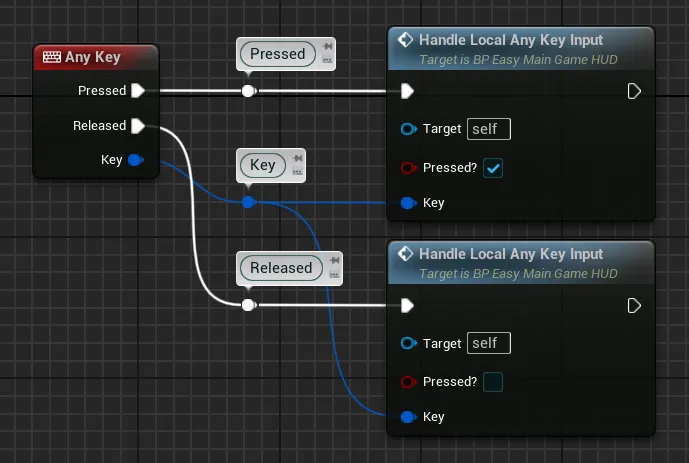
Please make sure that the pasted nodes have been copied correctly like on the image.
You should see twoHandle Local Any Key Inputfunctions, and most importantly the first should have thePressed?checkbox set toTrue, and the second set toFalse -
Finally, click on the Any Key node and make sure the checkbox
Execute when Pausedis set to True.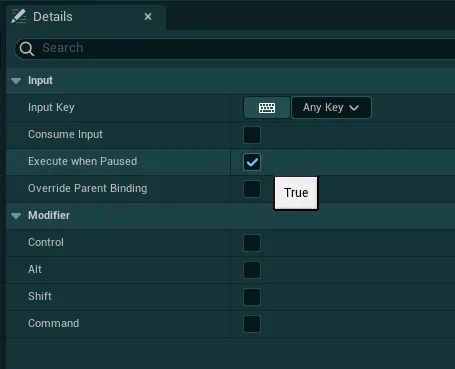
With this reparenting process, you can still keep working on your own HUD class for all your game logic, you don’t have to transfer or change anything inside the pack’s HUD class.
Situation C: Inherited Custom or C++ Game HUD
What you see: You have a custom Game HUD, but the Parent Class in the top-right corner is not the default HUD (e.g., it derives from a plugin or a C++ class or is a C++ class directly)

This means your Game HUD is derived from a different class than the default engine class or is a C++ class, follow Situation C instructions right below.
Situation C Instructions
Situation C
You have a custom C++ Game HUD Class (Or BP derived from custom C++)
- Go to the folder
EasyGameUI/Coreand open theBP_EasyMainGameHUDclass -
Inside this HUD Class, click on
Class Settingsand open the Details panel -
Locate the
Parent Class ”HUD”setting under theClass Optionscategory -
Click on the dropdown, search for the name of your HUD class and click on it
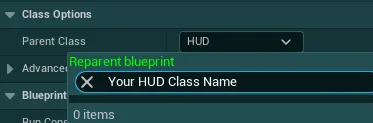
-
Unreal might display a warning popup about the operation, click on
Reparent -
Then, if you have a node
Any Keyinside your HUD class (not theEasy Main Game HUDClass), locate it and copy the code that you have after it -
Go back to the
Easy Main Game HUD Class, locate theAny Keynode and simply copy your code after it based on your needs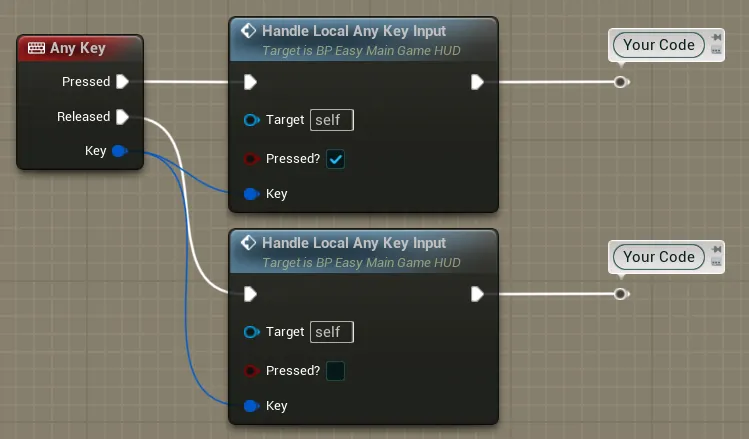
If your copied code contains Macro nodes, they won’t get copied properly and will have to be reimplemented inside theEasy Main Game HUDClass -
Finally, make sure to select the
BP_EasyMainGameHUDclass inside your gamemode, either from theProject Settings>Map & Modescategory or inside your Gamemode Class directly
Warning
If you have multiple gamemodes or levels that override the default gamemode class, make sure to set the HUD Class inside these overrides as well!
With this reparenting process, you can still keep working on your own HUD class for all your game logic, you don’t have to transfer or change anything inside the pack’s HUD class.